




Google Gemini’s new feature, Nano Banana, has become a social media sensation for creating realistic 4D-style portraits. The tool is integrated into the Gemini app and has sparked a wave of AI-generated photo trends on platforms like Instagram and X.
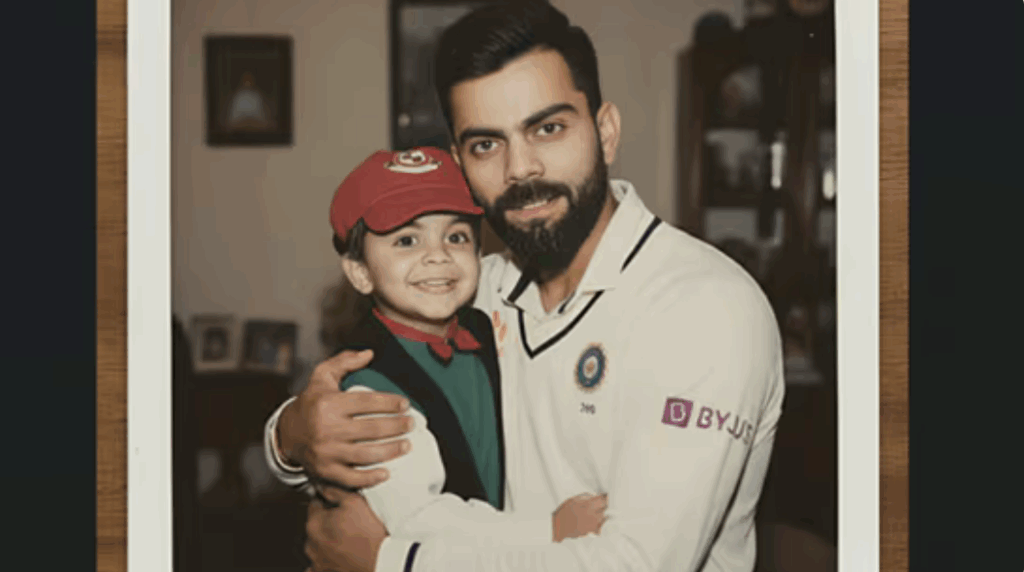
Among the popular trends is “Hug my younger self”, where AI generates nostalgic polaroid-style images showing a person’s current self hugging their childhood version.
How To Create “Hug My Younger Self” Image
Here is a step-by-step process on how to create a “Hug my younger self” image
To join the trend, users need to:
- Download the app from the Play Store or App Store.
- Sign in with a Google account.
- Upload two photos: one of their present self and one from childhood.
- Enter the prompt: “click a cute polaroid picture of my older self hugging my younger self.”
- Generate the image by tapping the arrow and waiting a few seconds.
Google Gemini Surpasses ChatGPT to Become Top Free App on App Store and Play Store
The feature’s viral popularity has boosted Gemini to the top of app charts, surpassing OpenAI’s ChatGPT as the most popular free app on both the Apple App Store and Google Play Store.
Between August 26 and September 9, the app reportedly gained over 23 million new users, reflecting strong global interest.
During the same period, users created more than 500 million images using Nano Banana, highlighting the massive scale of adoption.
Google Trends shows that searches for “google gemini photo” peaked following the feature’s viral launch.
The highest search volumes came from Gujarat, Maharashtra, Madhya Pradesh, Assam, and Jharkhand.
Related trending search terms include “gemini ai trend,” “ai gemini photo,” “google gemini ai photo trend,” “ai photo trend,” and “ai photo.”
Gemini’s Nano Banana Launched On Whatsapp By Perplexity: How To Use?
Using Nano Banana through WhatsApp is simple. Users can start a chat with Perplexity’s bot by saving the number +1 (833) 436-3285. To generate images, users just need to send an image and add a descriptive prompt. The more detailed the prompt, the better the results—matching the quality available on Google’s Gemini and AI Studio platforms.
Free or Paid Access?
Perplexity has not yet clarified if Nano Banana will be free on WhatsApp. Currently, Google offers limited free access to its AI models, while paid tiers unlock more features. A similar freemium model is expected for Perplexity’s WhatsApp bot, allowing casual users to experiment while offering paid options for power users.