




Microsoft CEO Satya Nadella was recently in the news when he went on record saying that AI still needs to prove its worth if society is to adopt it long-term.
Microsoft Launching AI Generated Colouring Books
Moving ahead, he said that he presumably thinks his company has cracked it with its latest innovation: AI coloring books.
It appears that a new Microsoft Paint feature is currently rolling out to Windows Insiders which basically allows users to generate coloring book pages based on the text prompt they enter.
Microsoft has already commenced the rolling out a fresh set of updates to two of the most familiar apps on Windows, Paint and Notepad, giving them artificial intelligence features that mark a noticeable shift from their traditionally simple roles.
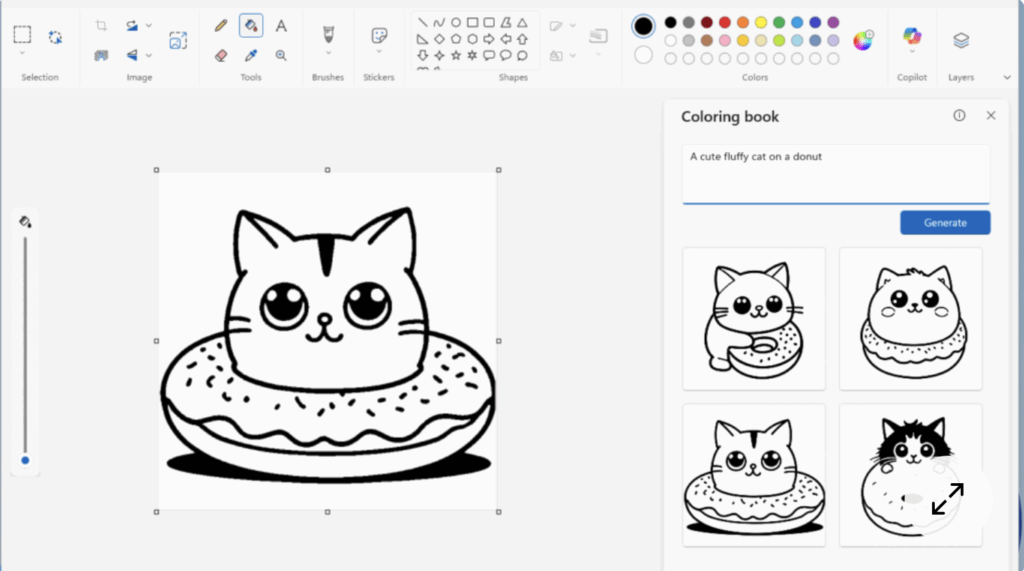
Reportedly, Paint is receiving one of the more eye-catching upgrades having a new feature called ‘colouring book’ which allows users to generate black-and-white colouring pages using simple text prompts.
This feature is available in Paint version 11.2512.191.0, the feature can be accessed through the Copilot menu.
In the Microsoft provided example, they used “a cute fluffy cat on a donut,” to which the AI tool will spit out a set of slightly different options based on your prompt.
Moving ahead, it provides users the options to choose which image they want and they can add it to your current workspace, copy or save it.
You can also print it out for the purpose of entertaining your kids, this is the kind of real-world impact the Microsoft chief was alluding to.
When it comes to the coloring book feature, it is exclusive to Copilot+ PCs, and Microsoft is also adding a fill tolerance slider that lets users adjust the precision with which the Fill tool adds color to your canvas.
Besides the Paint’s new Coloring book feature, Microsoft has also worked on its Write, Rewrite and Summarize AI functionality in Notepad which further integrates with GPT to fine-tune your writing and summarize complex notes.
How To Use It?
If you are wondering about how to use this feature, the user will have to sign into their Microsoft account to use cloud features.
Ready to get amazed as the results will now appear more quickly and it will let you interact with the preview without having to wait for its full response.
For getting hands on these new features, the user will need to be Windows Insider in the Canary and Dev channels on Windows 11 to take advantage of the updates initially.
The users simply have to describe what they want, such as a playful animal, a scenic view, or a cartoon-style object, and the app produces four different outline-style images.
They can directly add them to the canvas, where users can colour them digitally or even print them out for traditional colouring with pencils or crayons.
In addition to AI image generation, Paint is also gaining a more practical improvement.
The users will get finer control over how the Fill tool works with a new fill tolerance slider, hence making it easier to colour areas without unwanted spillover.
Please note here that this will not be limited to the Copilot hardware and will be released more widely, unlike the Colouring book feature.
Besides paint, Windows classic app, Notepad, is also getting a modern refresh with a new version, 11.2512.10.0, which brings more fluid AI-powered text features, including Write, Rewrite, and Summarise.
Under this update, the AI-generated text will be generated incrementally, so users can view the output as it is generated rather than waiting for the final output.